
















Sheet 05.811
AV Access · AV over IP
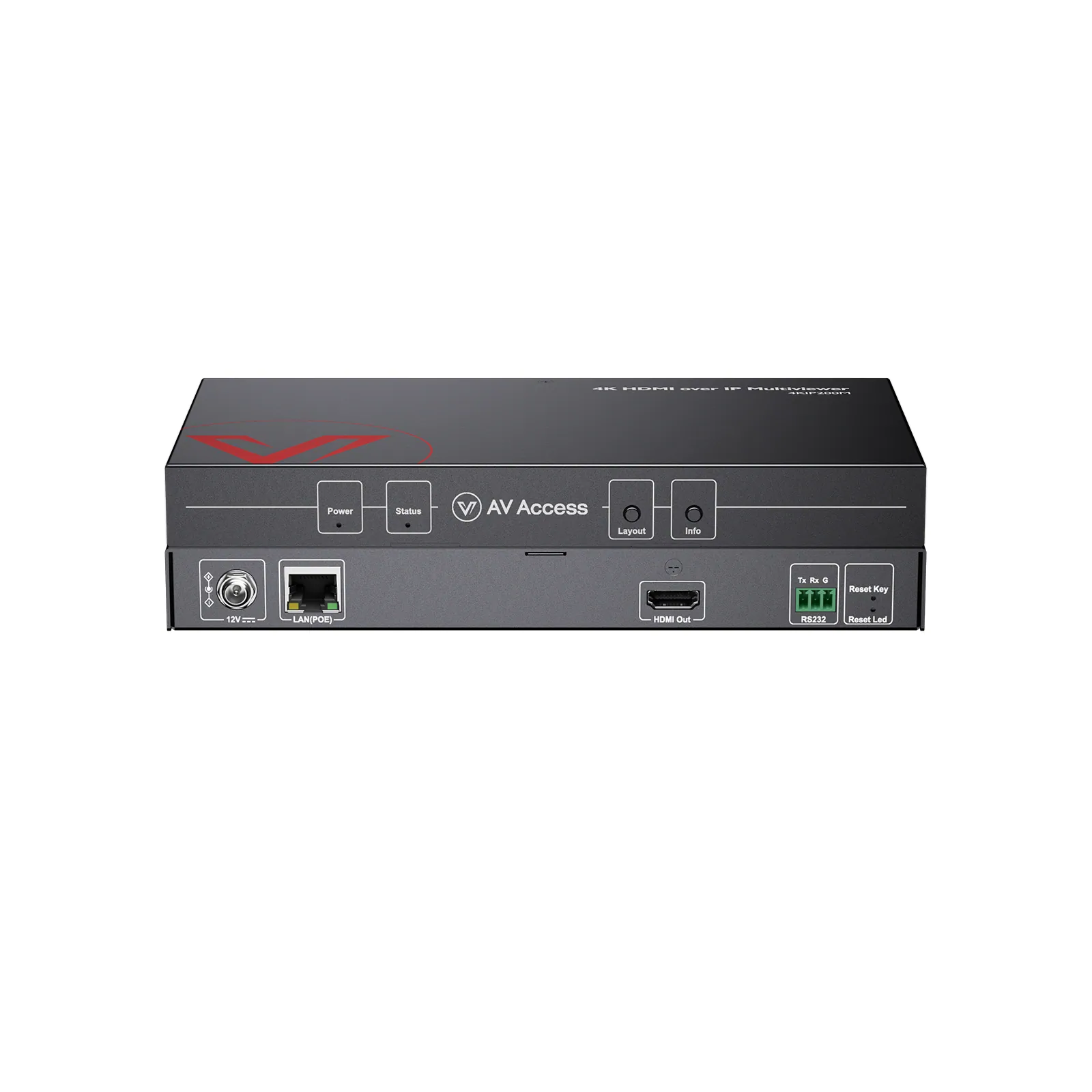
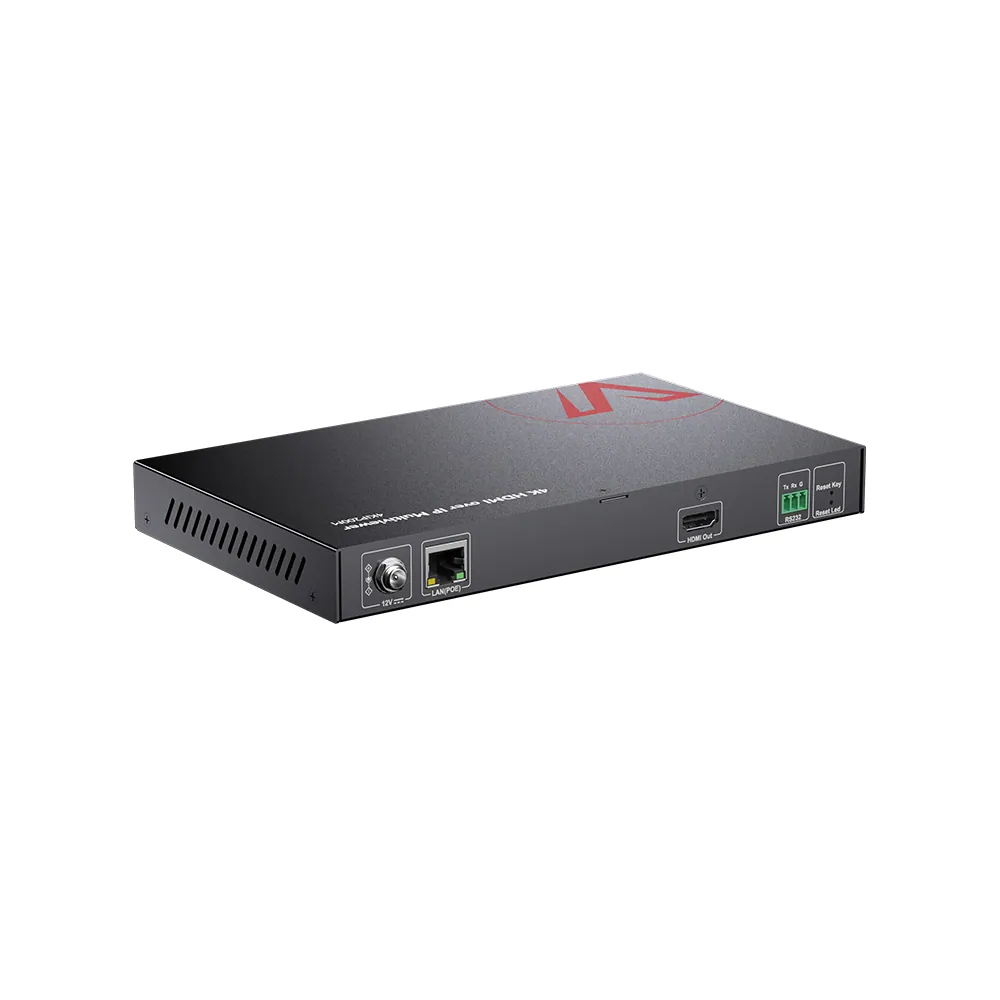
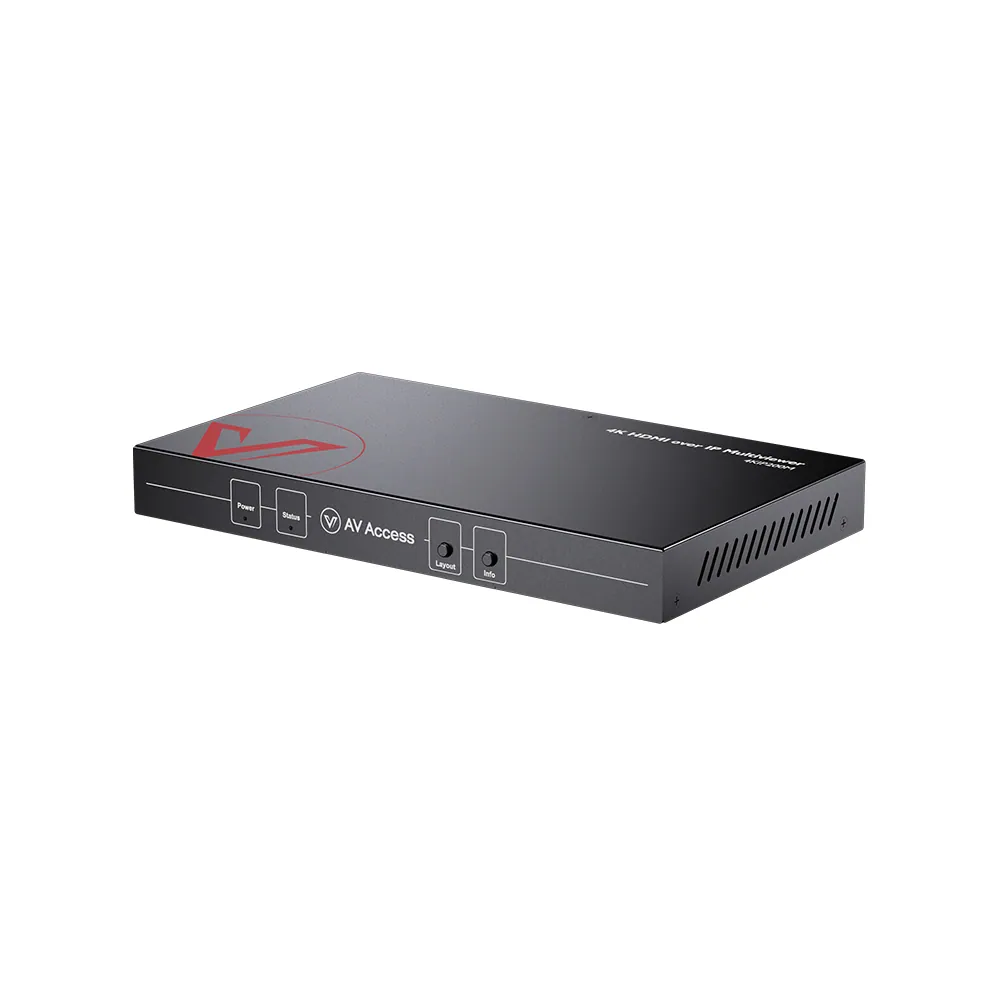
4K HDMI over IP multiview processor, quad view
Model4KIP200M
The 4KIP200 series is the industry’s first plug-and-play 4K AV over IP solution. Easily build a 4K IP matrix with video wall—perfect for sports bars, houses of worship, and retail.
4K HDMI over IP multiview processor, quad viewPrice on request Request a quotation
01VideoManufacturer's video on YouTube
AV Access 4K HDMI over IP multiview processor, quad view: the manufacturer's video
02SpecificationManufacturer's data · 6 groups · 31 values
What this product is, in numbers.
PDFUser ManualEN · 10 pages · 965 KB
The manufacturer's published values. We confirm the configuration and the values that matter for your project before an order.
01General15
- Main function
- A 4K AV over IP decoder for scalable HDMI matrix switching and video wall distribution, featuring multiview processing and seamless decoding over standard Gigabit networks.
- Target audience
- AV integrators, IT managers, commercial installers, sports bars, retail stores, education, enterprise, and digital signage users
- Critical scenarios
- Sports Bar, Retail Store, Shopping Mall, Restaurant, House of Worship, Control Room, Education, Digital Signage
- Key features
- 1. Multiview Support (4-in-1, PiP, 2 × 2, 1+3) / 2. 4K@30 Hz HDMI over IP Decoding / 3. Plug-and-Play, No Switch Configuration / 4. Video Wall up to 8 × 8 / 5. Flexible IP Matrix Switching / 6. VDirector App Control / 7. Works with Standard Gigabit Switches / 8. PoE Support / 9. Audio Extraction / 10. Auto Layout Switching
- Inputs
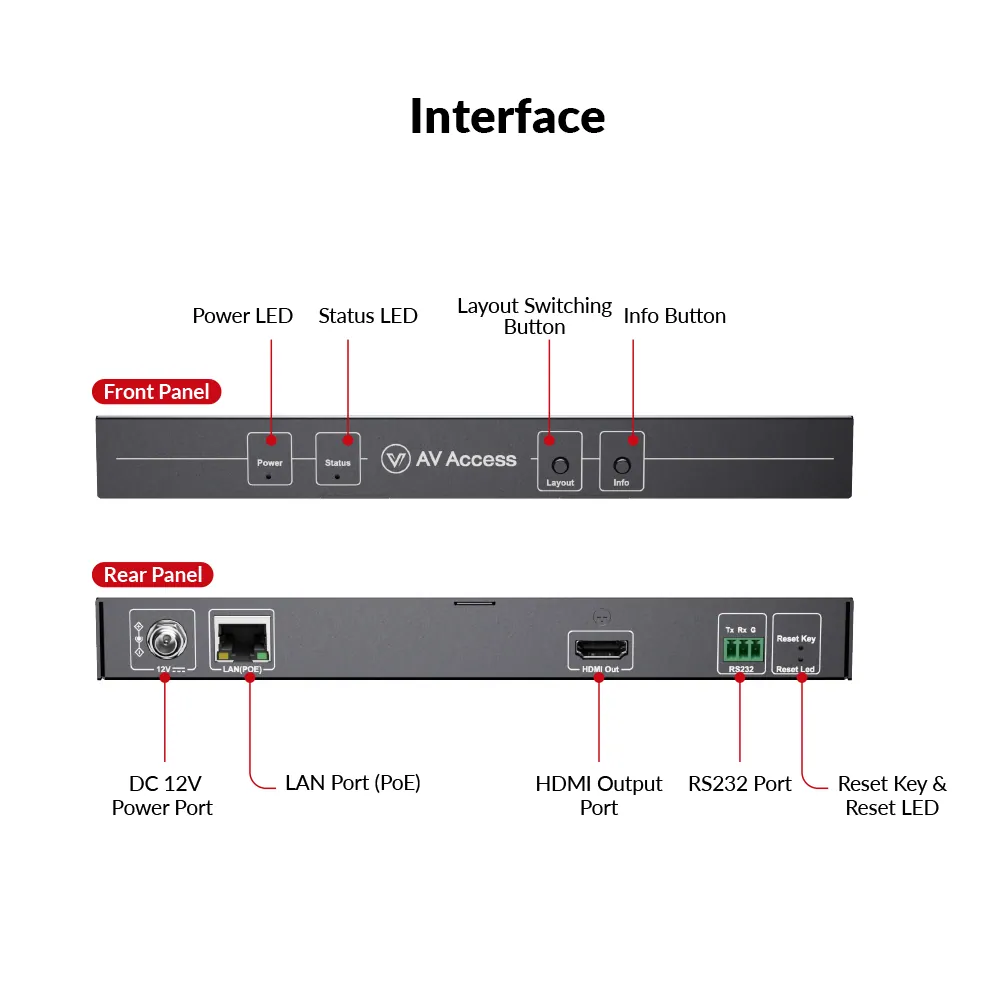
- 1x HDMI In, 1x LAN, 1x RS232
- Outputs
- 1x HDMI Out, 1x Audio Out
- System architecture
- Up to 4 Encoders to 1 Multiview Processor
- Multiview capability
- Displays up to 4 sources simultaneously on a single display with Quad View, Triple View, PiP, and Full Screen modes
- Product type
- 4KIP200E/D: Transmitter & Receiver / HDIP100E/D: Transmitter & Receiver / 4KIPJ200E/D: Transmitter & Receiver / 4KIP204E: Transmitter / 4KIP200M: Receiver / 4KIP100-KVM: Transmitter & Receiver
- Type of switch required
- 4KIP200E/D: 100M (1G recommended) / HDIP100E/D: 100M (1G recommended) / 4KIPJ200E/D: 1G / 4KIP204E: 100M (1G recommended) / 4KIP200M: 100M (1G recommended) / 4KIP100-KVM: 1G
- IGMP configuration
- 4KIP200E/D: Not Required / HDIP100E/D: Not Required / 4KIPJ200E/D: Not Required (one to one) / 4KIP204E: Not Required / 4KIP200M: Not Required / 4KIP100-KVM: Not Required
- Connection mode
- 4KIP200E/D: One to one, one to many, many to many / HDIP100E/D: One to one, one to many, many to many / 4KIPJ200E/D: One to one, one to many, many to many / 4KIP204E: One to one, one to many, many to many (works with 4KIP200D/4KIP200M) / 4KIP200M: One to one, one to many, many to many (works with 4KIP200E/4KIP204E) / 4KIP100-KVM: (Multiple) one to one
- Multiview
- 4KIP200E/D: No / HDIP100E/D: No / 4KIPJ200E/D: No / 4KIP204E: No / 4KIP200M: Yes / 4KIP100-KVM: No
- End-to-End latency
- 4KIP200E/D: 4K:300 ms; 1080P:100 ms / HDIP100E/D: 4K:300 ms; 1080P:100 ms / 4KIPJ200E/D: <4 ms / 4KIP204E: 4K:300 ms; 1080P:100 ms / 4KIP200M: 4K:300 ms; 1080P:100 ms / 4KIP100-KVM: Zero Latency
- KVM extension
- 4KIP200E/D: No / HDIP100E/D: No / 4KIPJ200E/D: Yes, up to 2x USB 2.0 Devices / 4KIP204E: No / 4KIP200M: No / 4KIP100-KVM: Yes, up to 3x USB 2.0 Devices
02Video6
- Scalability
- Supports integration with up to 254 codecs on the same LAN; displays up to 4 selected encoder streams simultaneously on one screen
- Supported video resolution
- 4KIP200E/D: Up to 4K@30hz / HDIP100E/D: Up to 1080P@60 Hz / 4KIPJ200E/D: Up to 4K@60hz / 4KIP204E: Up to 4K@30hz / 4KIP200M: up to 4K@60 Hz (single view mode) / 4KIP100-KVM: Up to 4K@30hz; 1080P@120hz
- HDMI
- 4KIP200E/D: 1.4 / HDIP100E/D: 1.3 / 4KIPJ200E/D: 2.0 / 4KIP204E: 1.4 / 4KIP200M: 2.0 / 4KIP100-KVM: 1.4
- HDCP
- 4KIP200E/D: 2.2 / HDIP100E/D: 1.4 / 4KIPJ200E/D: 2.3 / 4KIP204E: 2.2 / 4KIP200M: 2.2 / 4KIP100-KVM: 1.4
- One-to-One transmission range
- 4KIP200E/D: Transmits 4K@30hz HDMI signal up to 120 m / 394 ft / HDIP100E/D: Transmits 1080P@60hz HDMI signal up to 120 m / 394 ft / 4KIPJ200E/D: Transmits 4K@60hz HDMI signal up to 120 m / 394 ft / 4KIP204E: Transmits 4K@30hz HDMI signal up to 120 m / 394 ft / 4KIP200M: Transmits 4K@30hz HDMI signal up to 120 m / 394 ft / 4KIP100-KVM: Transmits 4K@30hz HDMI signal up to 120 m / 394 ft
- Video wall
- 4KIP200E/D: Yes, up to 8 × 8 / HDIP100E/D: Yes, up to 8 × 8 / 4KIPJ200E/D: Yes, up to 16 × 16 / 4KIP204E: Yes, up to 8 × 8 (need to work with 4KIP200D) / 4KIP200M: No / 4KIP100-KVM: No
03Audio1
- Audio channel
- 4KIP200E/D: Stereo / HDIP100E/D: Stereo / 4KIPJ200E/D: 7.1 Channel / 4KIP204E: Stereo / 4KIP200M: Stereo / 4KIP100-KVM: 7.1 Channel
04Control and interfaces6
- USB ports
- N/A
- Controls
- VDirector App (iOS/Android/Windows)
- Network
- Standard Gigabit Ethernet (Managed or Unmanaged Switch, No IGMP Required)
- HDMI interface
- 4KIP200E/D: Transmitter: 1x HDMI in / Receiver: 1x HDMI out / HDIP100E/D: Transmitter: 1x HDMI in / Receiver: 1x HDMI out / 4KIPJ200E/D: Transmitter: 1x HDMI in / Receiver: 1x HDMI out / 4KIP204E: 4x HDMI in / 4KIP200M: 1x HDMI out / 4KIP100-KVM: Transmitter: 1x HDMI in / Receiver: 1x HDMI out
- RS232
- 4KIP200E/D: Yes / HDIP100E/D: Yes / 4KIPJ200E/D: Yes / 4KIP204E: No / 4KIP200M: Yes / 4KIP100-KVM: No
- Visual control on app
- 4KIP200E/D: Yes, VDirector / HDIP100E/D: Yes, VDirector / 4KIPJ200E/D: Yes, VisualM / 4KIP204E: Yes, VDirector / 4KIP200M: Yes, VDirector / 4KIP100-KVM: No
05Power2
- Power
- DC12 V 1 A / PoE
- PoE
- 4KIP200E/D: Yes / HDIP100E/D: Yes / 4KIPJ200E/D: Yes, PoE+ / 4KIP204E: No / 4KIP200M: Yes / 4KIP100-KVM: No
06Packaging1
- Included cables
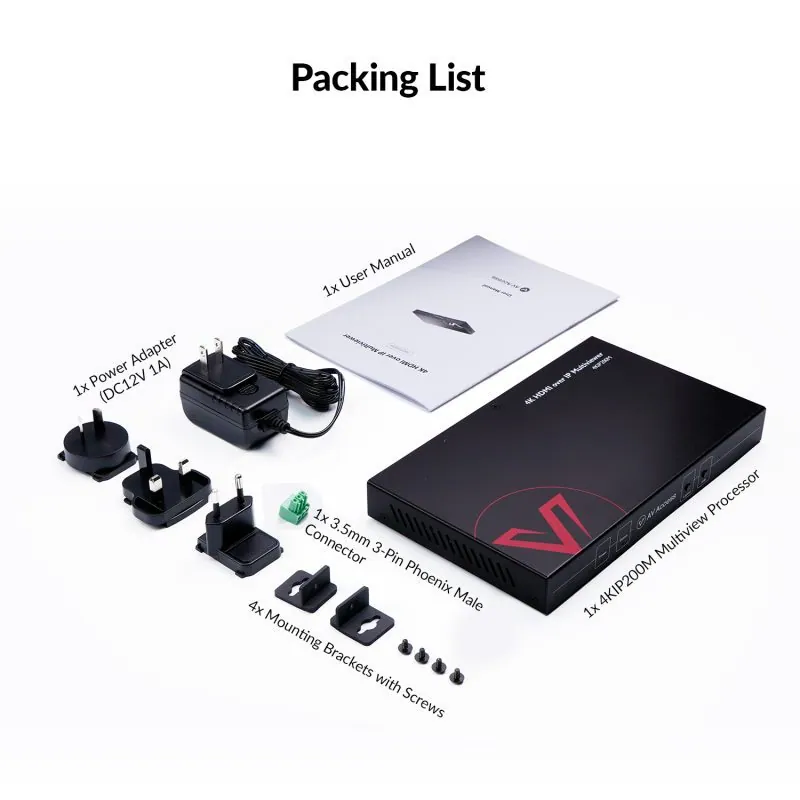
- 1x Power Adapter (DC 12 V 1 A) / 1 × 3.5 mm 3-Pin Phoenix Male Connector / 4x Mounting Brackets with Screws
Show the full specificationHide the rest of the specification0 more groups · 0 values
03DescriptionManufacturer's description
What it is.
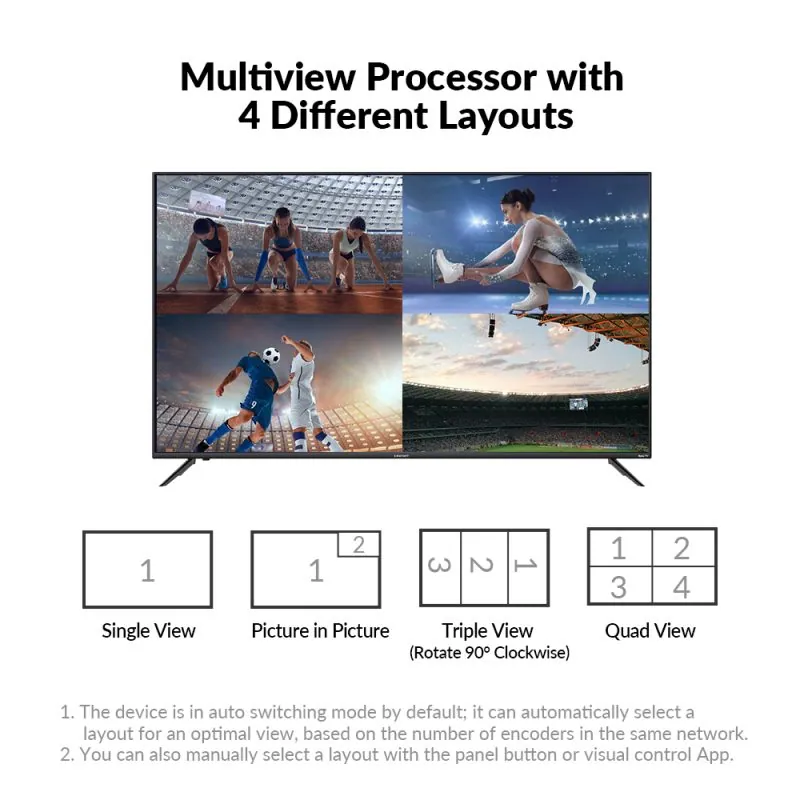
● 4K Multiview Display: Connect up to 4 sources via 4KIP200E/204E encoders and show them on one screen in full 4K clarity. ● 4 Layout Modes: Switch easily between single view,picture-in-picture , vertical triple, and quad view via panel button or app. ● Auto Layout Switching: In auto mode, it automatically selects the optimal layout based on the number of encoders within the same network. ● Zero Configuration: Work with universal Ethernet switches, no IGMP required. ● Visual Control: Manage all codes in “VDirector” App, available on PC, tablet, and smartphone. ● Compact & Cost-Efficient: Save space and reduce switch port usage with its all-in-one design, cutting both installation time and cost.
Important Notes before Purchasing
This product can’t be used alone; it needs to work with 4KIP200E/4KIP204E encoders. All accessories are also not sold separately.
If it’s not everything you hoped for, we’ll make it right with a refund — your satisfaction comes first. Free Shipping* 3-Day Delivery from Local Warehouse (US/CA)* 30-Day Money-Back Guarantee* 3-Year Warranty for Partners*
AV over IP for World Cup
Get your bar ready. In minutes.
Works directly with standard Gigabit switches — no switch configuration required. Truly plug and play.
Sports Bar Solution
Scale 4K AV over IP Matrix with Ease
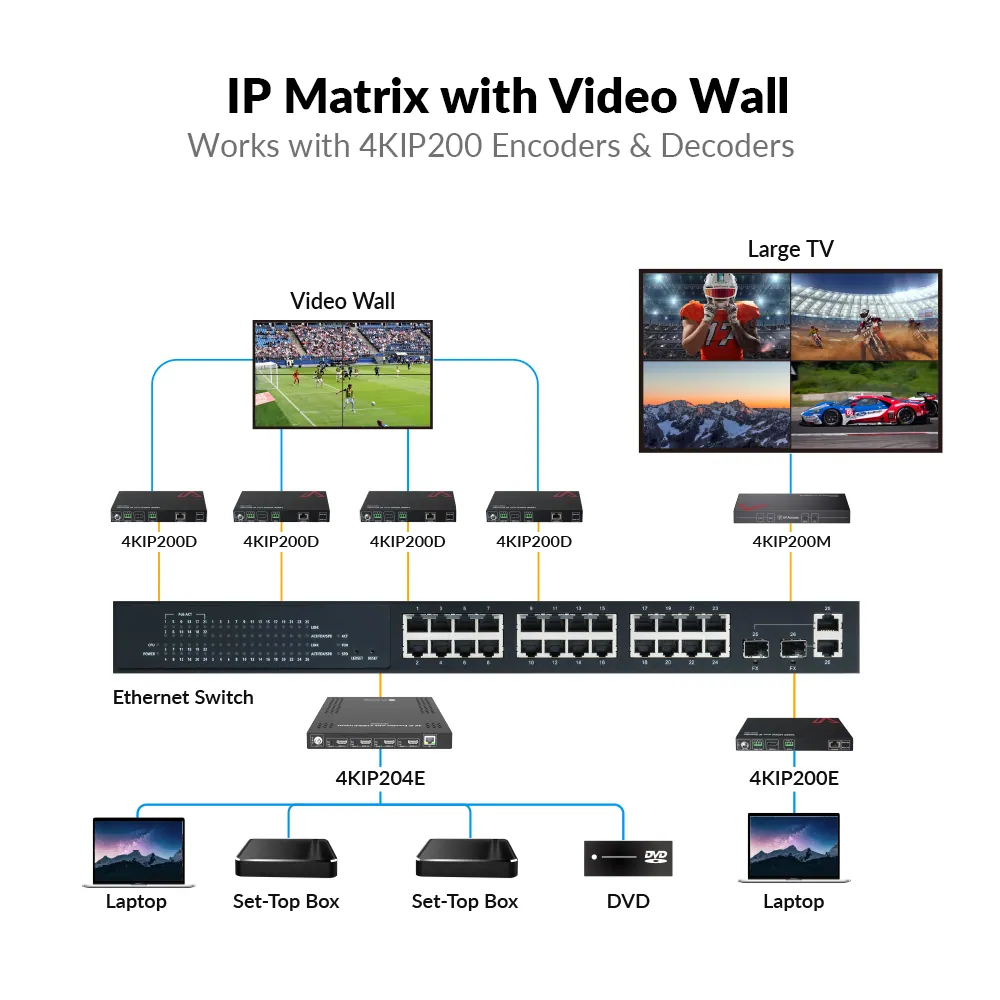
The 4KIP200M is a plug-and-play 4K AV over IP decoder designed for scalable video walls, flexible matrix switching and reliable HDMI distribution over standard Gigabit networks with no complex configuration required.
FLEXIBLE LAYOUTS
One Screen, Multiple Views
This 4K multiview decoder supports single view, picture-in-picture (PIP), vertical triple view, and quad view, allowing you to display up to four sources on one screen with ease. In default auto switching mode, it intelligently selects the optimal layout based on the number of connected sources. You can also switch layouts manually using the front “Layout” button or the VDirector app on your smartphone, tablet, or PC.
*Notes : 1. When the device is in the PIP/triple/quad view mode, it outputs the audio of the HDMI source 1, which is shown in the picture. 2. Before using the triple view mode, please first rotate your monitor 90-degree counterclockwise.*
One to One
One to Many
Many to Many
4KIP200M
4K HDMI over IP Multiview Processor
See More on One Screen with Up to 4 Sources in Flexible Layouts
PLUG & PLAY
Quick Setup, No Hassle
Compatible with standard Ethernet switches—no IGMP setup required for many-to-many connections. Just plug in and it’s ready to use, making installation effortless for both professionals and end-users.
· No Switch Configuration · Effortless Visual Control · CEC Support
Unboxing & Setup Video ▶
STEP 1
Connect sources to 4KIP200E/204E encoders and a display to the 4KIP200M decoder.
STEP 2
Connect all devices to a standard Ethernet switch (no IGMP required).
STEP 3
Preview display output in real time.
*Note: For mobile/tablet preview via VDirector, connect the switch to a wireless router.*
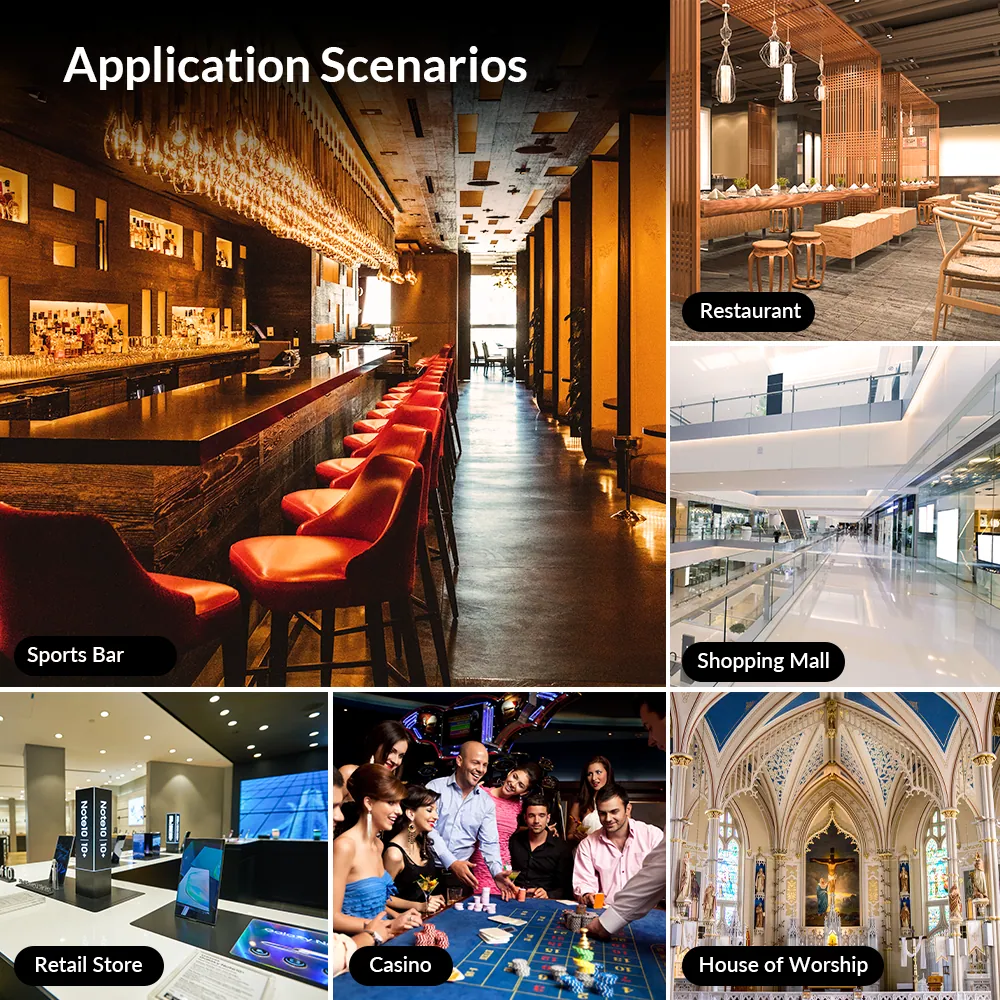
APPLICATIONS
Flexible Across All Scenarios
SPORTS BAR
RESTAURANT
RETAIL & Shopping Mall
HOUSE OF WORSHIP
Bring Every Game to One Screen with Stunning Clarity
Display up to 4 live games or channels on a single screen with flexible layouts. The multiview capability creates a dynamic and immersive viewing environment, keeping patrons engaged from every angle.
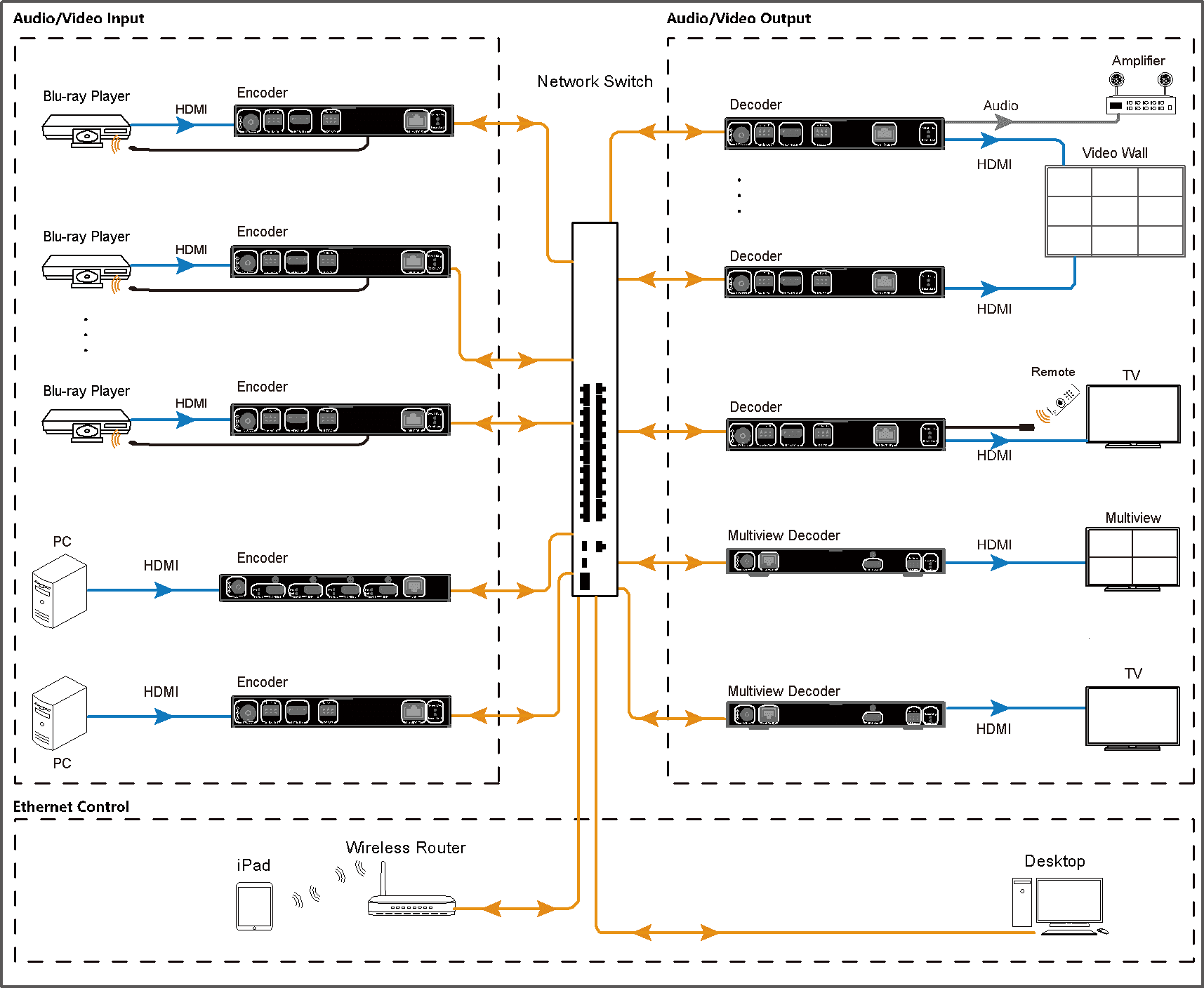
View Connection Diagram >
Engage Diners with Live Feeds and Digital Menus
Combine multiple content sources—sports, promotions, and menu boards—into one display. Enhance the ambiance and deliver a seamless, modern dining experience.
Highlight Promotions and Brands in a Single View
Use multiview displays to showcase product ads, videos, and campaigns simultaneously. Switch between layouts effortlessly to draw shopper attention and boost engagement.
Deliver a Unified Visual Experience to Every Seat
Merge live feeds, sermon slides, lyrics, and more into one screen layout. Ensure every member of the congregation can follow along, no matter where they’re seated.
See It Across Every Scenario
Sports bar
*Bring Every Game to One Screen with Stunning Clarity*
Restaurant
- *Engage Diners with Live Feeds and Digital Menus*
- Retail & Shopping Mall
- *Highlight Promotions and Brands in a Single View*
- View Connection Disgram >
House of Worship
*Deliver a Unified Visual Experience to Every Seat*
Apply Now
VISUAL CONTROL
Your Visual System, Fully in Your Hands
Easily control your entire system with the intuitive VDirector app on your phone, tablet, or Windows PC. Switch sources, create and manage video walls, adjust volume, turn displays on or off via CEC, and group decoders for multi-zone control—all with simple visual operation.
Download VDirector for Windows > Watch VDirector Tutorial >
With the visualized and user-friendly VDirector App, you can perform the settings below:
⭐Preview all sources and preset different scenarios; ⭐Switch any source to any or all displays; ⭐Drag-and-drop to perform matrix switching; ⭐Create/Delete a video wall up to 8×8 within 15 seconds; ⭐Enable CEC function to turn on/off all connected displays.
*Source Switch*
*Video Wall Switch*
*Create Video Wall*
*Naming & Sequencing*
*Change Password*
*CEC*
HIGH RESOLUTION
Immersive Audio-Video Experience
Deliver up to 4K@60Hz resolution in single view mode, with high-quality audio output for smooth, detailed, and engaging playback across all layouts.
- · 4K@60Hz · Stereo Audio · Stable Transmission
- · 4K@60Hz · Stable Transmission
- · Synchronized Audio Output
Plug & Play
Works flawlessly with universal Ethernet switches; no need to configure IGMP. Set up within minutes, just plug and play.
Visual Control
Manage all encoders and decoders through the VDirector app on your PC, tablet, or smartphone—no extra control system required.
Multiview Display
Display up to four AV sources on one screen with flexible layout modes for efficient monitoring and engaging visuals.
RS-232 Control
Provides integration with control systems via RS-232 for flexible serial communication.
PoE Support
Supports Power over Ethernet to simplify installation and reduce cable clutter.
CEC Control
Power on or off all connected displays with a single tap through the VDirector app.
04Documents7 files · 140 MB
Documents and files.
Datasheets, manuals, drawings and certificates as the manufacturer publishes them.
05Related products
In the same range.
06Talk to us
 4K HDMI over IP multiview processor, quad viewAV Access · EQ-811
Need this priced for your project?
- Quantity and site
- Configuration and interfaces
- Quotation